
Key Takeaways
• Ultra-low latency video streaming delivers live video with less than one second of end-to-end delay.
• ITU-T Recommendation G.114 states that one-way delay below 150 ms leaves most applications essentially unaffected, and advises against exceeding 400 ms.
• Video latency builds up across encoding, packaging, network transit, buffering and decoding, so every stage has to be shortened.
• Forward error correction is central to real-time video links because retransmitted packets usually arrive too late to be useful.
What is ultra-low latency video streaming?
Ultra-low latency video streaming is live video delivered with an end-to-end delay of less than one second between the moment a frame is captured and the moment it appears on screen. Conventional internet streaming often runs 30 to 60 seconds behind real time, and low-latency streaming typically brings that down to a few seconds; ultra-low latency is the tier below that.
Exact definitions differ across the industry, and some sources place the low-latency tier closer to 5 to 15 seconds. What stays consistent is the goal: a feed close enough to real time that a person can react to what they see, or a machine can act on it, without the delay changing the outcome. A concise definition of ultra-low latency video streaming in the context of defense and security video is a useful reference point for teams writing requirements.
Why does sub-second latency matter for drones and defense video?
Sub-second latency matters because operators of drones, robots and remote weapons stations are making decisions based on the video itself, and every fraction of a second of delay is time in which the real scene has already changed. In a broadcast, a few seconds of delay is an inconvenience; in remote piloting, target tracking or perimeter security, it can mean steering toward where an object used to be.
This is why mission-critical video systems are now specified in milliseconds rather than seconds. Some drone-oriented dual-channel H.265 codecs are designed for end-to-end streaming latency of around 100 ms, and products for cellular networks pair narrow-band compression with ultra-low-latency delivery. A look at real-world applications of low-latency streaming shows how the same requirement appears across defense, security and commercial markets.
How low is low enough?
For interactive use, the most widely cited benchmark is ITU-T Recommendation G.114, which states that if one-way delay stays below 150 ms, most applications are not significantly affected. The same recommendation advises that one-way delay should not exceed 400 ms for general network planning.
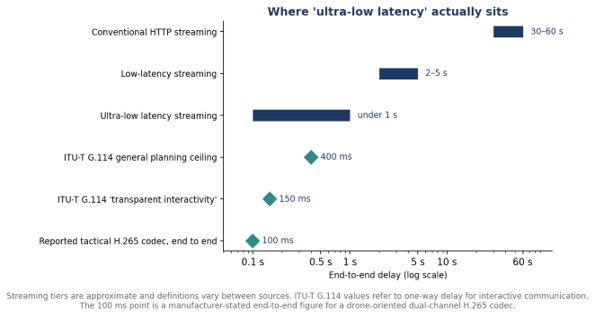
G.114 was written with voice in mind, but the ITU’s one-way transmission time recommendation explicitly extends its guidance to non-speech applications as well, which makes it a reasonable yardstick for interactive video. For video that drives real-time control, it suggests a practical target: keep the full glass-to-glass path comfortably inside 150 ms where possible, and treat anything approaching 400 ms as a problem.
Where does video latency come from?
Video latency is the sum of small delays at every stage between the camera sensor and the display, not a single number produced by one device. Reducing it means shortening every queue in the pipeline:
- Encoding: look-ahead and frame buffering inside the encoder before compressed data leaves it.
- Packaging: wrapping compressed video into segments or packets for transport.
- Network transit: propagation, queuing and serialization across radio, cellular or wired links.
- Buffering: jitter and playback buffers on the receiving side that smooth out uneven arrival times.
- Decoding and display: decompressing frames and rendering them on screen.
Buffering is the hidden cost. Receivers hold incoming data briefly so playback stays smooth when packets arrive unevenly, but every millisecond of buffer is a millisecond of added delay. Systems built for ultra-low latency keep these buffers as shallow as the network allows.
Which protocols deliver ultra-low latency?
WebRTC is a widely used protocol built for sub-second, interactive video, while Low-Latency HLS keeps the content-delivery-network packaging of traditional streaming and typically accepts somewhat more delay. The two make different trade-offs in transport, scaling and playback, so the right choice depends on audience size and how interactive the application needs to be.
Mission video often sits outside both models. A drone feeding a single ground station over a dedicated radio link is not a mass-audience stream, and purpose-built point-to-point pipelines can strip away segmenting and large buffers entirely. For a wider view of how this plays out in the field, how real-time UAV video links are reshaping ISR traces the end-to-end chain from airborne sensor to operator.
How do ultra-low latency systems handle packet loss?
Ultra-low latency systems handle lost data mainly by correcting it at the receiver rather than asking for it to be resent, because a retransmitted packet usually arrives after the moment it belonged to has passed. That makes forward error correction, which sends redundant data alongside the video, a core building block of real-time links.
Wireless links on moving platforms are exactly where packet loss is hardest to avoid. Terrain, distance, interference and jamming all degrade the channel, and a latency-focused design has to keep the picture usable through those conditions rather than freezing while it waits for missing data.
How does compression affect latency?
Better compression lowers latency indirectly by shrinking the stream so it fits a narrow link without congestion, as long as the encoder itself is configured for low delay. Research on H.265/HEVC found the codec especially effective for low-delay communication applications, a profile that suits narrow tactical video links.
The trade-off is processing. Heavier compression settings and long look-ahead windows improve efficiency but add delay inside the encoder, so ultra-low latency systems tune for the shortest practical encoding path and rely on dedicated hardware to keep it fast.
What should buyers ask about latency?
Buyers should ask for end-to-end, glass-to-glass latency measured under realistic link conditions, not just the encoder’s internal processing delay. A figure measured on a clean bench network can look very different once a real radio link, jitter buffer and decoder are added. Ask how latency changes as bandwidth drops, how the system behaves during packet loss, and whether the number quoted includes display.
It is also worth asking how many streams the system can carry before latency rises. A single camera may hit its target easily, but adding a thermal channel, recording or onboard analytics can lengthen the pipeline. Testing the full configuration that will actually fly, over the actual link that will carry it, is the only reliable way to know whether a system meets a sub-second requirement in the field rather than only on paper.
Frequently Asked Questions
What counts as ultra-low latency in video streaming?
Ultra-low latency video streaming generally means an end-to-end delay of less than one second, and ITU-T G.114 guidance suggests interactive uses are largely unaffected when one-way delay stays below 150 ms.
What is the difference between low latency and ultra-low latency?
Low-latency streaming usually delivers video a few seconds behind real time, while ultra-low latency streaming brings the delay below one second.
What is glass-to-glass latency?
Glass-to-glass latency is the total delay from the camera lens capturing a frame to that frame appearing on the viewer’s screen, including encoding, transmission, buffering and decoding.
Which protocol has the lowest latency for live video?
WebRTC is widely used for sub-second interactive streaming, while Low-Latency HLS trades some extra delay for easier large-scale delivery.
