
| Key Takeaways • Shadow AI discovery is the process of finding AI applications, accounts, agents, and tools used without IT or security oversight. • Discovery tools rely on network monitoring, SaaS and OAuth audits, browser extension inventories, endpoint agents, and code scans, and no single method sees everything. • IBM’s 2026 report found shadow AI in 43 percent of security incidents, up from 20 percent a year earlier. • Blocking a few AI websites does not address AI embedded in SaaS products, desktop applications, coding tools, or connected agents. |
What is shadow AI discovery?
Shadow AI discovery is the process of finding AI applications, accounts, agents, and tools that employees use without IT or security oversight. It is the first control in an AI security program, because policy, monitoring, and enforcement all depend on knowing what exists. The AI discovery gap is the term for the distance between the AI that is actually in use and the AI that security teams can see.
The gap grows because AI adoption happens from the bottom up. Using a chatbot rarely involves a purchase order or an IT ticket, most SaaS products now embed AI features, developers add coding assistants on their own, and employees sign in with personal accounts on corporate devices. By the time a security team hears about a tool, it is often already connected to business data.
What forms does shadow AI take?
Shadow AI takes several forms, including personal chatbot accounts used for company work, unapproved coding tools installed by developers, and agents run by teams without security review. How shadow AI is defined in AI security stresses that motivation is usually convenience, not malice. The exposure comes from unknown data transfers, unmanaged accounts, unapproved integrations, and AI activity outside established policies.
Embedded AI adds another layer. An approved SaaS product can introduce a new AI feature through an update, which turns a sanctioned application into a source of unreviewed data processing without any new tool being installed.
Which methods do shadow AI discovery tools use?
Discovery tools generally rely on five methods: network and DNS monitoring, SaaS and OAuth audits, browser extension inventories, endpoint agents, and scans of code and configuration. Each sees a different slice of AI activity, and practitioner guidance consistently warns that no single method finds everything.
| Method | What it typically sees | Common blind spot |
| Network and DNS monitoring | Connections to known AI service domains | Encrypted content, desktop apps, and off-network devices |
| SaaS and OAuth audits | Third-party AI apps granted access to email, files, or calendars | Standalone chatbot use outside the OAuth flow |
| Browser extension inventory | AI extensions and browser-based AI use | Anything running outside the browser, such as desktop apps and IDEs |
| Endpoint agents | Locally installed AI tools and activity on managed devices | Unmanaged and personal devices |
| Code and configuration scans | API keys, model calls, and MCP servers in repositories | Tools used without any code footprint |
Because of those blind spots, programs usually combine methods and correlate the results. A network view finds standalone chatbot traffic, an OAuth audit finds apps wired into the tenant, and endpoint visibility finds the desktop apps, coding agents, and local servers the other two miss.
Two cases need particular care. MCP servers call for code and configuration scanning, not only network inspection, because a server is a standing process with its own credentials rather than a one-off request. Personal devices are the other gap: AI apps used on unmanaged hardware sit beyond the reach of both endpoint agents and network inspection, and policy and conditional access can narrow that exposure but not remove it.
Why is blocking AI websites not enough?
Blocking a short list of AI websites does not address AI embedded in SaaS products, desktop applications, coding tools, or connected agents. It also pushes usage toward personal devices and accounts, where visibility is lowest.
The alternative is to identify usage, distinguish managed business accounts from personal ones, classify services by risk, and enforce policies on sensitive interactions. That lets an organization restrict unsafe activity while permitting approved tools, which keeps security from becoming a blanket blocker for teams that rely on AI.
What does the data say about shadow AI risk?
The data shows that shadow AI is now common and costly. IBM’s 2026 Cost of a Data Breach Report found shadow AI involved in 43 percent of security incidents, up from 20 percent the year before, and those breaches averaged $5.39 million compared with $4.63 million, as Baker Donelson’s summary of the report explains.
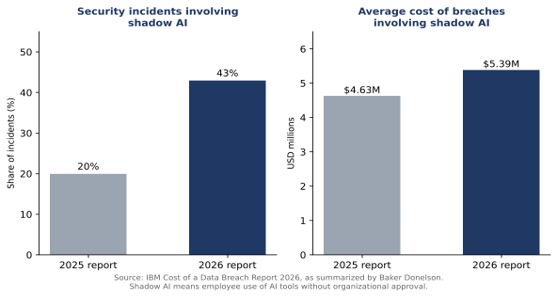
Governance lags behind. More than two-thirds of organizations reported no governance processes to limit shadow AI, according to Cybersecurity Dive’s coverage, and roughly one in five shadow AI breaches ended in a regulatory fine, as HIPAA Journal reported.
What should buyers look for in shadow AI discovery tools?
Buyers should look for coverage across the places AI actually runs, continuous operation, and a clear path from discovery to policy. The following criteria help compare options without relying on feature lists.
- Coverage: public GenAI apps, embedded SaaS features, coding agents, MCP servers, agent skills, and personal versus managed accounts.
- Continuity: ongoing discovery instead of periodic audits, since new tools appear daily.
- Context: risk classification of each service and visibility into the data involved.
- Action: the ability to redact, block, or restrict unsafe interactions while allowing approved tools.
Some products cover several of these at once. Ovalix, for instance, discovers unauthorized or unmanaged AI usage across supported applications, accounts, agents, and tools, then lets security teams monitor interactions and enforce redaction or blocking. At the device level, its endpoint product inventories AI apps, coding agents, MCP servers, and agent skills running on employee machines. A practical guide to securing AI agents on employee endpoints expands on that layer.
What should happen after shadow AI is discovered?
After discovery, teams should identify the service and account type, classify the risk, and apply policy. Some tools will be approved and moved under a managed account, some restricted to certain data types, and some blocked.
The step that most improves outcomes is feeding findings back into the approved-tool list. When employees have a sanctioned alternative that meets their needs, the pull toward unapproved options weakens, and the discovery program shifts from policing to maintaining an accurate picture of what the business uses. Repeating discovery on a regular schedule, with continuous monitoring in between, keeps that picture from going stale as new tools appear.
Frequently Asked Questions
What is shadow AI?
Shadow AI is the use of AI applications, accounts, agents, and tools without the visibility, monitoring, governance, or approval of IT or security teams.
How do you detect shadow AI in an organization?
Teams combine network and DNS monitoring, SaaS and OAuth audits, browser extension inventories, endpoint agents, and code scans, because no single method sees all AI activity.
Why is blocking AI websites not enough to control shadow AI?
AI also appears inside SaaS products, desktop applications, coding tools, and connected agents, which website blocking does not address.
How common is shadow AI in security incidents?
IBM’s 2026 Cost of a Data Breach Report found shadow AI involved in 43 percent of security incidents, up from 20 percent in the prior report.
